

Как автоматически назначить спрайты сотням изображений в Unity
Столкнулся с задачей, когда нужно было перегенерировать спрайты сотням моих изображений. Вручную открывать Sprite Editor и каждому изображению генерировать — такое себе «удовольствие». Так же пригодится, когда поверх предыдущих изображений с уже имеющимися своими спрайтами перезаписываете новые.
В текущем проекте в общей папке Assets создаём новую Editor (если ещё нету). В ней создаём новый пустой C# файл с именем «RegenerateSpriteOutlines.cs»

В него вставляем этот код:
using System;
using System.Collections.Generic;
using UnityEditor;
using UnityEditor.U2D.Sprites;
using UnityEngine;

public class RegenerateSpriteOutlines : EditorWindow
{
    // Настройки генерации (Оптимально для Detail = 0.2)
    private const float outlineTolerance = 0.2f;
    private const byte alphaTolerance = 15;

    [MenuItem("Tools/Force Automatically Regenerate All Outlines")]
    public static void RegenerateAllSelected()
    {
        UnityEngine.Object[] textures = Selection.GetFiltered(typeof(Texture2D), SelectionMode.Assets);

        if (textures.Length == 0)
        {
            Debug.LogWarning("Выделите текстуры (файлы изображений) в окне Project!");
            return;
        }

        int processedCount = 0;
        List pathsToReserialize = new List();

        foreach (UnityEngine.Object tex in textures)
        {
            string assetPath = AssetDatabase.GetAssetPath(tex);
            TextureImporter textureImporter = AssetImporter.GetAtPath(assetPath) as TextureImporter;
            if (textureImporter == null) continue;

            // 1. Временно открываем доступ к пикселям
            bool originalIsReadable = textureImporter.isReadable;
            TextureImporterCompression originalCompression = textureImporter.textureCompression;

            if (!originalIsReadable || originalCompression != TextureImporterCompression.Uncompressed)
            {
                textureImporter.isReadable = true;
                textureImporter.textureCompression = TextureImporterCompression.Uncompressed;
                textureImporter.SaveAndReimport();
            }

            Texture2D actualTex = AssetDatabase.LoadAssetAtPath(assetPath);
            if (actualTex == null) continue;

            // 2. Инициализируем провайдер данных Unity 2D Sprite
            var factory = new SpriteDataProviderFactories();
            factory.Init();
            var dataProvider = factory.GetSpriteEditorDataProviderFromObject(tex);
            if (dataProvider == null) continue;

            dataProvider.InitSpriteEditorDataProvider();
            var outlineProvider = dataProvider.GetDataProvider();
            if (outlineProvider == null) continue;

            SpriteRect[] spriteRects = dataProvider.GetSpriteRects();
            bool boundsAdjusted = false;

            for (int i = 0; i < spriteRects.Length; i++) { Rect r = spriteRects[i].rect; // Автоматический Resize границ под новые размеры картинки if (r.xMax > actualTex.width || r.yMax > actualTex.height || r.xMin < 0 || r.yMin < 0)
                {
                    float newXMin = Mathf.Clamp(r.x, 0, actualTex.width);
                    float newYMin = Mathf.Clamp(r.y, 0, actualTex.height);
                    float newXMax = Mathf.Clamp(r.xMax, 0, actualTex.width);
                    float newYMax = Mathf.Clamp(r.yMax, 0, actualTex.height);
                    spriteRects[i].rect = new Rect(newXMin, newYMin, newXMax - newXMin, newYMax - newYMin);
                    boundsAdjusted = true;
                }

                Rect pixelRect = spriteRects[i].rect;

                // Вычисляем половину размеров для правильного Pivot-смещения (Логика Unity)
                float halfWidth = pixelRect.width / 2f;
                float halfHeight = pixelRect.height / 2f;

                // 3. Трассируем контур индивидуально по пикселям изображения
                List<Vector2[]> rawPaths = TraceTextureOutlines(actualTex, pixelRect, alphaTolerance);
                List<Vector2[]> optimizedPaths = new List<Vector2[]>();

                foreach (var path in rawPaths)
                {
                    if (path.Length < 3) continue;

                    // Оптимизируем плотность точек (убираем лишние вершины под Detail = 0.2)
                    List optimizedList = OptimizePath(new List(path), outlineTolerance * 3f);
                    Vector2[] cleanedPath = new Vector2[optimizedList.Count];

                    for (int p = 0; p < optimizedList.Count; p++) { // ПРАВИЛЬНЫЙ ПЕРЕВОД КООРДИНАТ: смещаем точки относительно центра (от -half до +half) float localX = optimizedList[p].x - halfWidth; float localY = optimizedList[p].y - halfHeight; // Жесткий Clamp внутри границ спрайта с безопасным отступом в 0.5 пикселя localX = Mathf.Clamp(localX, -halfWidth + 0.5f, halfWidth - 0.5f); localY = Mathf.Clamp(localY, -halfHeight + 0.5f, halfHeight - 0.5f); cleanedPath[p] = new Vector2(localX, localY); } optimizedPaths.Add(cleanedPath); } // Записываем контур outlineProvider.SetOutlines(spriteRects[i].spriteID, optimizedPaths); } if (boundsAdjusted) { dataProvider.SetSpriteRects(spriteRects); } // Применяем изменения в мета-файл dataProvider.Apply(); // 4. Возвращаем оригинальные настройки сжатия textureImporter.isReadable = originalIsReadable; textureImporter.textureCompression = originalCompression; textureImporter.SaveAndReimport(); pathsToReserialize.Add(assetPath); processedCount++; } // 5. Полностью сбрасываем кэш импорта Unity, чтобы гарантированно убрать предупреждения в 8 файлах if (pathsToReserialize.Count > 0)
        {
            AssetDatabase.ForceReserializeAssets(pathsToReserialize);
        }

        Debug.Log($"[Outline Fixer] Успешно перегенерированы индивидуальные контуры для {processedCount} ассетов. Ошибки устранены.");
    }

    private static List<Vector2[]> TraceTextureOutlines(Texture2D tex, Rect rect, byte alphaThresh)
    {
        List<Vector2[]> paths = new List<Vector2[]>();
        int startX = (int)rect.x;
        int startY = (int)rect.y;
        int width = (int)rect.width;
        int height = (int)rect.height;

        bool[,] visited = new bool[width, height];
        float threshold = alphaThresh / 255f;

        for (int y = 0; y < height; y++)
        {
            for (int x = 0; x < width; x++) { Color c = tex.GetPixel(startX + x, startY + y); if (c.a >= threshold && !visited[x, y] && IsBorderPixel(tex, startX, startY, width, height, x, y, threshold))
                {
                    List currentPath = new List();
                    int cx = x, cy = y;
                    int dir = 0;
                    int startPointX = x, startPointY = y;
                    int loopProtect = 0;

                    do
                    {
                        visited[cx, cy] = true;
                        currentPath.Add(new Vector2(cx + 0.5f, cy + 0.5f));

                        bool foundNext = false;
                        for (int d = 0; d < 4; d++) { int checkDir = (dir + 3 + d) % 4; int nx = cx + (checkDir == 0 ? 1 : checkDir == 2 ? -1 : 0); int ny = cy + (checkDir == 1 ? -1 : checkDir == 3 ? 1 : 0); if (nx >= 0 && nx < width && ny >= 0 && ny < height) { if (tex.GetPixel(startX + nx, startY + ny).a >= threshold)
                                {
                                    cx = nx;
                                    cy = ny;
                                    dir = checkDir;
                                    foundNext = true;
                                    break;
                                }
                            }
                        }
                        if (!foundNext) break;
                        loopProtect++;

                    } while ((cx != startPointX || cy != startPointY) && loopProtect < 5000); if (currentPath.Count > 2) paths.Add(currentPath.ToArray());
                }
            }
        }
        return paths;
    }

    private static bool IsBorderPixel(Texture2D tex, int sx, int sy, int w, int h, int x, int y, float t)
    {
        if (x == 0 || x == w - 1 || y == 0 || y == h - 1) return true;
        if (tex.GetPixel(sx + x + 1, sy + y).a < t) return true;
        if (tex.GetPixel(sx + x - 1, sy + y).a < t) return true;
        if (tex.GetPixel(sx + x, sy + y + 1).a < t) return true;
        if (tex.GetPixel(sx + x, sy + y - 1).a < t) return true;
        return false;
    }

    private static List OptimizePath(List points, float epsilon)
    {
        if (points.Count < 3) return points;

        int maxIndex = 0;
        float maxDistance = 0;

        for (int i = 1; i < points.Count - 1; i++) { float distance = PerpendicularDistance(points[i], points[0], points[points.Count - 1]); if (distance > maxDistance)
            {
                maxIndex = i;
                maxDistance = distance;
            }
        }

        if (maxDistance > epsilon)
        {
            List left = OptimizePath(points.GetRange(0, maxIndex + 1), epsilon);
            List right = OptimizePath(points.GetRange(maxIndex, points.Count - maxIndex), epsilon);

            left.RemoveAt(left.Count - 1);
            left.AddRange(right);
            return left;
        }

        return new List { points[0], points[points.Count - 1] };
    }

    private static float PerpendicularDistance(Vector2 p, Vector2 p1, Vector2 p2)
    {
        float num = Mathf.Abs((p2.y - p1.y) * p.x - (p2.x - p1.x) * p.y + p2.x * p1.y - p2.y * p1.x);
        float den = Mathf.Sqrt(Mathf.Pow(p2.y - p1.y, 2) + Mathf.Pow(p2.x - p1.x, 2)); return num / (den == 0 ? 1 : den);
    }
}
В начале в строках

указываем нужные нам параметры, которые выставляли бы в редакторе спрайтов:
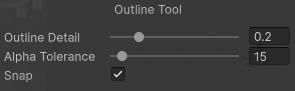
В скрипте учтены предупреждения типа:
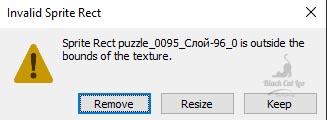
если обнаружено, что предыдущий спрайт не соответствует размеру нового изображения.
Сохраняете данный скрипт. После перекомпиляции сверху в меню появится новый пункт Tools

Открываете свою папку с картинками, выбираете все, которым нужно перегенерировать спрайты. В меню выбираете наш скрипт:

Ждём завершения его работы. Всё.
Версия Юнити, на которой это проверено — 6000.3.8f1 (видна на скринах выше).